


Prueba gratuita de 14 días
Realice evaluaciones ergonómicas ilimitadas durante dos semanas. Todo lo que necesitas es tu teléfono.

One ergonomic assessment is manageable. The problem is when a safety team has dozens of jobs to evaluate, limited time to do it, and a process that still depends on a lot of manual observation and scoring.
That is the problem AI ergonomic assessment tools are built around. Using video and computer vision, they can automate parts of the work that used to happen by hand. The rest of the assessment still depends on how the task is captured, how the results are interpreted, and what the team does next.
An ergonomic assessment becomes AI-powered when software takes over parts of the analysis that an evaluator would otherwise perform manually. In camera-based systems, computer vision analyzes video of the task, identifies body positions and movement, and turns that information into data used for ergonomic analysis and scoring.
The assessment is still looking for the same types of ergonomic exposure. OSHA notes that MSD risk depends on factors such as work posture, task frequency, required effort, and duration. NIOSH also identifies force, repetition, and posture as important physical risk factors. What changes is how much of the analysis has to be completed manually.
In a video-based AI ergonomic assessment, the process starts with a recording of the task. A safety professional captures the worker performing the job using a camera or smartphone, giving the software a view of the movement it needs to analyze.
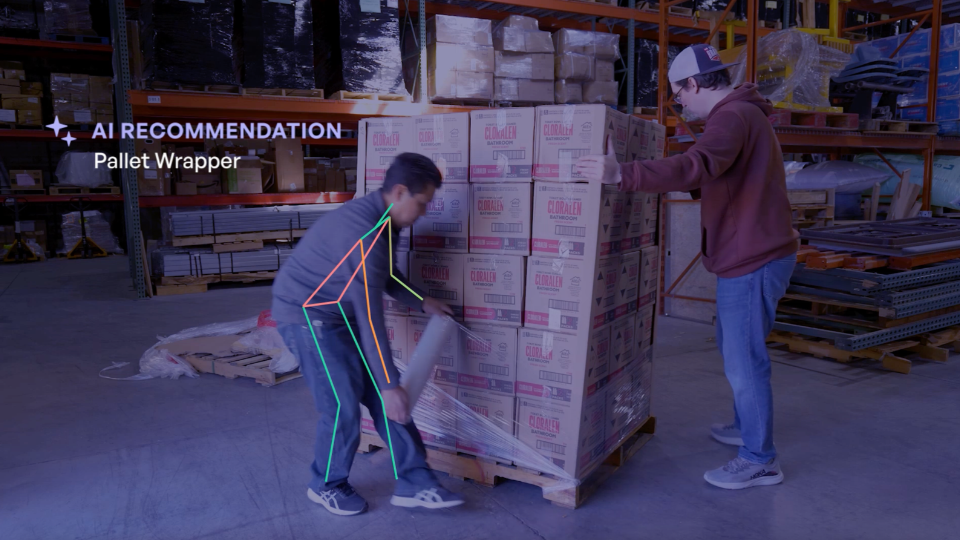
Computer vision tracks body positions and movement throughout the recording. Depending on the system, it can estimate joint positions and evaluate exposure factors. Those measurements then feed into the ergonomic analysis and scoring, reducing the amount of manual interpretation and calculation required.
The safety team receives that analysis as ergonomic information it can use to see where exposure may be occurring and which tasks may need closer attention.
Traditional and AI-assisted ergonomic assessments can both start with observation or video. The real difference is how much of the analysis the evaluator has to complete by hand.
For a single assessment, that may simply mean less manual work. Across an ergonomics program, the difference can become much more significant.
A safety professional may know exactly how to assess one workstation. The harder part is covering dozens of jobs across multiple shifts, changing processes, or several facilities. When every assessment requires substantial manual analysis, teams may have to limit how much work they evaluate.
Automation can give them more capacity to assess those tasks and return to them after changes are made. If a workstation is modified or material handling changes, another assessment can help show whether the targeted exposure decreased.
AI can reduce the work involved in an ergonomic assessment, but the analysis still depends on capturing a task that actually represents the job. A clear recording only tells you what happened during the part of the work that was recorded.
Consider palletizing. A recording taken while a pallet is waist-high may give the system a clear view of the worker's movement. The same task can look very different when the worker is placing cases on the bottom layer or reaching across a nearly completed pallet. An accurate analysis of one part of the job can still miss exposure that occurs elsewhere in the task.
This is where safety judgment still matters. The safety and operations team needs to decide whether the recording represents normal exposure and account for conditions the video may not fully capture. They also have to determine which findings require action.
The assessment cannot decide what that action should be. Teams still need to understand what is driving the exposure and choose a practical intervention. After the change, they can assess the task again to see whether the targeted exposure decreased.
The challenge for many safety teams is finding the time to assess enough of the work to make a difference. When every task requires manual observation, scoring, documentation, and follow-up, even a solid ergonomics program can struggle to keep up.
TuMeke Risk Suite helps reduce that workload by automating more of the assessment process. That gives teams more room to focus on the work that comes after the score:
If your ergonomics program is finding more work than your team has time to assess, request a TuMeke demo to see how Risk Suite could fit into your assessment process.
Accuracy depends on the system and the quality of the video being analyzed. Computer vision can estimate posture and movement, but factors such as camera position, lighting, occlusion, and worker orientation can affect the results. AI-generated findings should still be reviewed in the context of the actual task.
Not necessarily. AI can automate parts of established ergonomic assessment methods rather than replacing them. Some platforms use computer vision to capture movement data and automate calculations or scoring for methods such as RULA and REBA, reducing the manual work required to complete the assessment.
Not with camera-based systems. These tools can analyze worker movement from standard video, including footage captured with a smartphone. That allows safety teams to assess tasks without requiring workers to wear motion sensors or other devices during the assessment.
AI can automate movement analysis, calculations, and other parts of the assessment, but it cannot make every decision around the work. Safety professionals still need to determine whether the task captured is representative, interpret the findings in context, select appropriate improvements, and decide what requires follow-up.
Yes, when the platform supports repeat assessments. Teams can assess a task before an intervention and then evaluate it again after the change. For the comparison to be useful, both assessments should capture similar work conditions so the team can see whether the targeted exposure actually changed.
%201.svg)


.jpg)

.jpg)
.jpg)

One ergonomic assessment is manageable. The problem is when a safety team has dozens of jobs to evaluate, limited time to do it, and a process that still depends on a lot of manual observation and scoring.
That is the problem AI ergonomic assessment tools are built around. Using video and computer vision, they can automate parts of the work that used to happen by hand. The rest of the assessment still depends on how the task is captured, how the results are interpreted, and what the team does next.
An ergonomic assessment becomes AI-powered when software takes over parts of the analysis that an evaluator would otherwise perform manually. In camera-based systems, computer vision analyzes video of the task, identifies body positions and movement, and turns that information into data used for ergonomic analysis and scoring.
The assessment is still looking for the same types of ergonomic exposure. OSHA notes that MSD risk depends on factors such as work posture, task frequency, required effort, and duration. NIOSH also identifies force, repetition, and posture as important physical risk factors. What changes is how much of the analysis has to be completed manually.
In a video-based AI ergonomic assessment, the process starts with a recording of the task. A safety professional captures the worker performing the job using a camera or smartphone, giving the software a view of the movement it needs to analyze.
Computer vision tracks body positions and movement throughout the recording. Depending on the system, it can estimate joint positions and evaluate exposure factors. Those measurements then feed into the ergonomic analysis and scoring, reducing the amount of manual interpretation and calculation required.
The safety team receives that analysis as ergonomic information it can use to see where exposure may be occurring and which tasks may need closer attention.
Traditional and AI-assisted ergonomic assessments can both start with observation or video. The real difference is how much of the analysis the evaluator has to complete by hand.
For a single assessment, that may simply mean less manual work. Across an ergonomics program, the difference can become much more significant.
A safety professional may know exactly how to assess one workstation. The harder part is covering dozens of jobs across multiple shifts, changing processes, or several facilities. When every assessment requires substantial manual analysis, teams may have to limit how much work they evaluate.
Automation can give them more capacity to assess those tasks and return to them after changes are made. If a workstation is modified or material handling changes, another assessment can help show whether the targeted exposure decreased.
AI can reduce the work involved in an ergonomic assessment, but the analysis still depends on capturing a task that actually represents the job. A clear recording only tells you what happened during the part of the work that was recorded.
Consider palletizing. A recording taken while a pallet is waist-high may give the system a clear view of the worker's movement. The same task can look very different when the worker is placing cases on the bottom layer or reaching across a nearly completed pallet. An accurate analysis of one part of the job can still miss exposure that occurs elsewhere in the task.
This is where safety judgment still matters. The safety and operations team needs to decide whether the recording represents normal exposure and account for conditions the video may not fully capture. They also have to determine which findings require action.
The assessment cannot decide what that action should be. Teams still need to understand what is driving the exposure and choose a practical intervention. After the change, they can assess the task again to see whether the targeted exposure decreased.
The challenge for many safety teams is finding the time to assess enough of the work to make a difference. When every task requires manual observation, scoring, documentation, and follow-up, even a solid ergonomics program can struggle to keep up.
TuMeke Risk Suite helps reduce that workload by automating more of the assessment process. That gives teams more room to focus on the work that comes after the score:
If your ergonomics program is finding more work than your team has time to assess, request a TuMeke demo to see how Risk Suite could fit into your assessment process.
Accuracy depends on the system and the quality of the video being analyzed. Computer vision can estimate posture and movement, but factors such as camera position, lighting, occlusion, and worker orientation can affect the results. AI-generated findings should still be reviewed in the context of the actual task.
Not necessarily. AI can automate parts of established ergonomic assessment methods rather than replacing them. Some platforms use computer vision to capture movement data and automate calculations or scoring for methods such as RULA and REBA, reducing the manual work required to complete the assessment.
Not with camera-based systems. These tools can analyze worker movement from standard video, including footage captured with a smartphone. That allows safety teams to assess tasks without requiring workers to wear motion sensors or other devices during the assessment.
AI can automate movement analysis, calculations, and other parts of the assessment, but it cannot make every decision around the work. Safety professionals still need to determine whether the task captured is representative, interpret the findings in context, select appropriate improvements, and decide what requires follow-up.
Yes, when the platform supports repeat assessments. Teams can assess a task before an intervention and then evaluate it again after the change. For the comparison to be useful, both assessments should capture similar work conditions so the team can see whether the targeted exposure actually changed.